
.png?width=1440&height=622&name=Accounting%20Service%20Menu%20Image%20(1).png)
.png?width=1440&height=622&name=Tech%20Service%20Menu%20Image%20(1).png)
.png?width=1440&height=622&name=Financial%20Serivce%20Menu%20Image%20(1).png)
.png?width=1440&height=622&name=M%26A%20Service%20Menu%20Image%20(1).png)
.png?width=1440&height=622&name=Talent%20Service%20Menu%20Image%20(1).png)
%20(1).jpg?width=264&height=160&name=Website%20Featured%20Content%20Images%20(2)%20(1).jpg)
%20(1).jpg?width=264&height=160&name=Website%20Featured%20Content%20Images%20(4)%20(1).jpg)
-Mar-08-2024-08-50-35-9527-PM.png?width=300&height=175&name=Untitled%20design%20(1)-Mar-08-2024-08-50-35-9527-PM.png)

%20(1)-1.jpg?width=264&height=160&name=Website%20Featured%20Content%20Images%20(2)%20(1)-1.jpg)
-1.jpg?width=264&height=160&name=Website%20Featured%20Content%20Images%20(1)-1.jpg)
%20(1).jpg?width=264&height=160&name=Website%20Featured%20Content%20Images%20(3)%20(1).jpg)


.jpg)

Tony DeSantis and Megan Whittaker

Inventory is one of the largest uses of cash for many businesses, yet it’s often managed with limited visibility or at the wrong level of detail. Many organizations track inventory only at the total or category level, which provides a snapshot of value but not insight into which specific units are aging, turning slowly, or accumulating financing costs.
When decisions are based on outdated reports or disconnected systems, it becomes difficult to balance supply with demand. Without timely, reliable data, companies are left reacting instead of planning, leading to excess inventory, missed sales, and unnecessary strain on cash flow.
What types of challenges occur without data visibility?
Many organizations have access to data, but not in a way that’s easy to use or act on. As a result, these common challenges tend to surface:
- Over-ordering to avoid stockouts
- Slow-moving or obsolete inventory going unnoticed
- Inconsistent forecasting and purchasing decisions
- Limited insight into how inventory impacts financial performance
These issues don’t just affect operations; they directly impact margins, liquidity, and a company’s ability to secure financing.
A Look at How Data Shapes Outcomes
Company A: Operating Without Clear Visibility
Company A, a mid-size distributor, relies on spreadsheets and static ERP reports to manage inventory. The data exists, but it’s delayed, disconnected, and difficult to interpret.
To avoid stockouts, the team often over-orders. Slow-moving items aren’t identified until it’s too late, and excess inventory builds over time.
On paper, the business appears stable. In reality, cash is tied up in inventory that isn’t moving. When leadership approaches their lender, inconsistent turnover and aging inventory raise concerns, resulting in tighter terms and limited access to capital.
The challenge: A lack of visibility leads to reactive decisions, strained cash flow, and missed growth opportunities.
Company B: Making Data Work for the Business
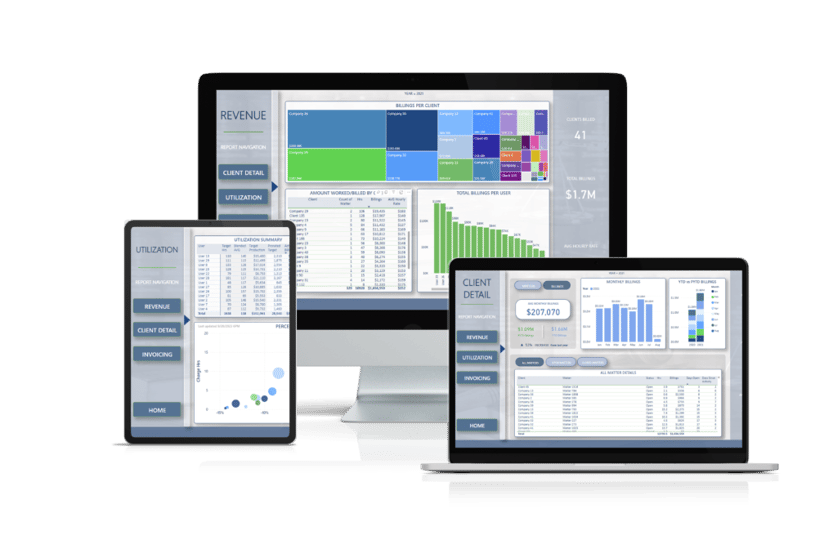
Company B takes a different approach. By using Power BI, they bring together data from across systems into a single, real-time view. Instead of guessing, the team can quickly see what’s happening and adjust:
- Slowing SKUs are flagged early
- Purchasing aligns with actual demand
- Inventory levels stay in line with sales trends
When it’s time to meet with lenders, they’re not just presenting numbers. They’re telling a clear, data-backed story. Strong turnover, controlled inventory levels, and consistent performance help build confidence.
The result: More cash on hand, stronger margins, and better financing options to support growth.
What is Power BI, and what is its purpose?
Power BI is Microsoft’s data visualization and analytics tool that pulls information from multiple systems into interactive dashboards and reports. Instead of relying on static spreadsheets, businesses can access real-time insights in one place. Unlike traditional reporting tools, Power BI allows users to drill down into the data behind the numbers, helping leadership understand not just what happened, but why.
When applied to inventory management, Power BI connects operational data (like purchasing, sales, and inventory levels) with financial data. This moves inventory decisions from reactive to proactive.
How Data Improves Forecasting and Purchasing
With the right data in place, inventory decisions become more proactive and precise. Instead of relying on historical averages or gut instinct, teams can make adjustments based on what’s actually happening in the business.
- Identify trends and seasonality in demand: Spot patterns early and plan inventory levels ahead of peak or slow periods
- Adjust purchasing based on real-time sales activity: Avoid over-ordering by aligning purchases with current demand, not outdated reports
- Reduce excess inventory while maintaining service levels: Reallocate or scale back on slow-moving items without increasing the risk of stockouts
This level of visibility allows businesses to shift from reactive ordering to more intentional planning.
4 Key Inventory KPIs to Track
Tracking the right metrics is critical to understanding how inventory impacts overall performance.
1. Core Inventory Performance KPIs
- Inventory Turnover Ratio: How often inventory is sold and replaced over a period
- Days Inventory Outstanding (DIO): Average number of days inventory is held before sale
- Gross Margin Return on Inventory (GMROI): Profit earned for every dollar invested in inventory
2. Efficiency & Accuracy KPIs
- Stockout Rate: Frequency of running out of inventory
- Overstock Percentage: Portion of inventory exceeding optimal levels
- Inventory Accuracy: Match rate between recorded and actual inventory
3. Demand & Forecasting KPIs
- Forecast Accuracy: How closely demand forecasts match actual sales
- Sell-Through Rate: Percentage of inventory sold within a given timeframe
4. Cash Flow & Financial Impact KPIs
- Carrying Cost of Inventory: Total cost to store and maintain inventory
- Inventory as % of Working Capital: How much cash is tied up in inventory
Understanding how these metrics interact can also influence decisions around inventory valuation methods, which play a role in both reporting and tax strategy.
The Impact on Cash Flow, Margins, and Financing
Inventory acts as a financial lever. When managed effectively:
- Cash is freed up for reinvestment
- Carrying costs are reduced
- Margins improve through better purchasing and pricing decisions
From a financing perspective, Lenders often look beyond total inventory value and focus on quality, how quickly it turns, how much is aging, and how consistently it performs over time. Businesses with clear visibility and strong metrics are typically in a better position to negotiate favorable terms.
Lutz Tech Can Turn Your Data into Something Meaningful
Many organizations are collecting the right information but lack the tools or structure to use it effectively. Our data analytics services help businesses connect data across systems, identify the right KPIs, and build reporting that supports more informed decision-making.
With the right visibility in place, companies can move beyond static reports and start using data to improve operations, strengthen financial performance, and plan for growth. Contact us to learn more.

- Maximizer, Deliberative, Consistency, Adaptability, Relator
Tony DeSantis
Data Analytics Shareholder
Tony DeSantis, Data Analytics Shareholder, began his career in 1999. With over two decades of experience in data analytics and forensics, he has honed his skills in interpreting complex data sets and designing impactful visual reports.
Leading Lutz's Data Analytics offering, Tony specializes in data management and the application of artificial intelligence to simplify business processes and create solutions that directly impact their bottom line. He values the firm's unique blend of technical skills and business expertise, which enables them to provide well-rounded solutions to their clients.
At Lutz, Tony is passionate about mentoring and developing emerging talent within the firm. Additionally, he has been actively involved in various policy committees, contributing his expertise to shaping the firm's strategic direction. As the leader of the data analytics team, he consistently strives to make the complex simple for clients, helping them uncover the stories hidden in their information.
Tony lives in Omaha, NE, with his wife and four children. Outside the office, you can find him attending and coaching his kids' sporting events and other activities.
Recent News & Insights

Market Commentary
The Market Is Harder to Outsmart Than It Looks
If you are looking for a reason to make a change to your portfolio, today’s market provides ...

Nonprofit
Tailoring QuickBooks Online to Fit Your Nonprofit’s Needs
For nonprofit organizations, every dollar matters. At the same time, accurate financial ...

Family Office
The Great Wealth Transfer: Retaining the Next Generation
Most families with substantial wealth already have the documents. They likely have a will, ...

Recent News
Lutz adds Phothisane and Rolf
Lutz, a Nebraska-based business solutions firm, recently added Sackey Phothisane and MaKayla ...


Let’s get you where you want to go.
We work to simplify complexities, help make critical business decisions, and confidently focus on the things that are truly important to you. We embrace your business as our own to spark the right solutions and help you thrive.