
.png?width=1440&height=622&name=Accounting%20Service%20Menu%20Image%20(1).png)
.png?width=1440&height=622&name=Tech%20Service%20Menu%20Image%20(1).png)
.png?width=1440&height=622&name=Financial%20Serivce%20Menu%20Image%20(1).png)
.png?width=1440&height=622&name=M%26A%20Service%20Menu%20Image%20(1).png)
.png?width=1440&height=622&name=Talent%20Service%20Menu%20Image%20(1).png)
%20(1).jpg?width=264&height=160&name=Website%20Featured%20Content%20Images%20(2)%20(1).jpg)
%20(1).jpg?width=264&height=160&name=Website%20Featured%20Content%20Images%20(4)%20(1).jpg)
-Mar-08-2024-08-50-35-9527-PM.png?width=300&height=175&name=Untitled%20design%20(1)-Mar-08-2024-08-50-35-9527-PM.png)

%20(1)-1.jpg?width=264&height=160&name=Website%20Featured%20Content%20Images%20(2)%20(1)-1.jpg)
-1.jpg?width=264&height=160&name=Website%20Featured%20Content%20Images%20(1)-1.jpg)
%20(1).jpg?width=264&height=160&name=Website%20Featured%20Content%20Images%20(3)%20(1).jpg)


.jpg)

.png)
Agricultural operations generate more data than ever from crop inputs, equipment usage, and yield history to labor hours, financial performance, and customer demand. But without the right tools, that information often lives in disconnected systems or static spreadsheets, making it difficult to analyze trends or make decisions quickly.
Power BI changes that. By transforming raw data into interactive dashboards, farms and ag businesses gain real-time visibility into their operations and the ability to move from reactive decisions to proactive strategy.
Why does Power BI matter to modern agriculture?
Many farms still rely on manual reporting processes or siloed systems, which can lead to delays, errors, and missed opportunities. Power BI provides a central place to consolidate information and see the full picture of your operation.
With the right setup, teams can:
- Analyze historical trends to identify patterns or outliers, whether in sales, labor efficiency, input usage, or equipment operating costs.
- Drill into details using interactive visualizations, slicing data by employee, month, customer, project, field, equipment type, and more.
- Automate reporting workflows that were historically manual, which saves time, reduces frustration, and eliminates human error.
- Spot issues earlier, such as declining margins, underperforming fields, or cost increases.
- Make decisions based on real data, not gut instinct or incomplete spreadsheets.
Connecting Power BI to Your Ag Systems
The value of Power BI lies in its ability to bring multiple systems together into one unified reporting environment. Most operations start by integrating core platforms such as:
- Accounting software: revenue, expenses, margins, and overhead.
- Crop management systems: planting, spraying, yield data, and field performance.
- Equipment tracking and telematics: machine hours, service records, fuel usage, and operating cost per unit.
- Labor tracking and payroll: employee efficiency, time allocation, and cost per job or field.
Design a Dashboard That Works for Agriculture
A well-built dashboard should show the big picture first, then let users drill into the details. At Lutz, we design Power BI reports so that key insights stand out immediately, including high and low performers, unexpected variances, or trends that need attention. Below are several reporting best practices:
Start High-Level, Then Drill Down
Give users a broad view of the operation (profitability, productivity, and performance), then allow them to explore the “why” behind any outlier or change.
Use Color Intentionally
Visual cues help users understand performance at a glance.
- Green = positive performance (high margins, strong yields, efficient equipment).
- Red = areas that need attention (declining profitability, overspent projects, low labor productivity).
Tailor Dashboards
A parts manager shouldn’t see service team employee metrics, and a CFO doesn’t need every operational detail. Row Level Security (RLS) ensures each user sees only what’s relevant to their role, reducing noise and improving usability.
Build with the Dnd-User in Mind
Reports should be clean, intuitive, and aligned with how teams actually work. If a user cannot understand a dashboard in seconds, they won’t use it.
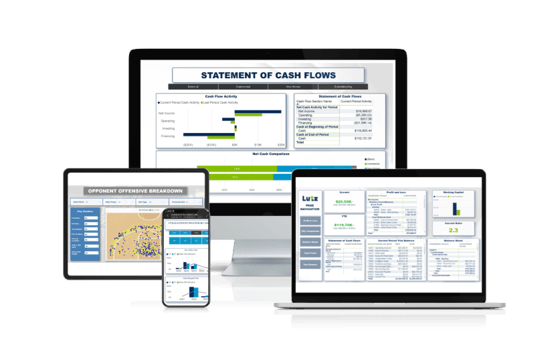
What insights can Power BI help you uncover?
When built correctly, analytics can reveal insights that were never visible in traditional reporting. Examples include:
- Identifying which employees consistently exceed efficiency targets.
- Pinpointing equipment with the lowest margin percentage or highest cost per hour.
- Tracking which customers or product lines drive the most profitable sales.
- Comparing year-over-year trends in input costs, yields, or service revenue.
- Monitoring cash flow and forecasting based on real operational patterns.
These insights empower leaders to take action sooner, allocate resources more effectively, and manage risk more proactively.
Overcoming Common Challenges
Implementing analytics in agriculture can come with hurdles, but the right approach ensures long-term success.
Data Quality
Disparate systems often store information differently. Establishing clear, consistent data practices early makes the entire reporting structure more reliable.
User Adoption
A report only helps if people use it. Training is essential. We recommend hands-on demonstrations tailored to each role, showing specific examples of how the dashboard makes their job easier.
Workflow Integration
Dashboards should complement existing processes. Automated data refreshes ensure the information is always current, while intuitive navigation helps users quickly find what they need.
What Clients are Saying
Through our work with John Deere dealership, Agrivision, teams gained clearer visibility into performance metrics, improved reporting efficiency, and strengthened decision-making across departments. Reflecting on the impact of these tools, our client shared, “Since we’ve deployed the Lutz tools, I have more conversations with people throughout the organization on what's going on than I ever have. People are really digging in.” Click here to view our client testimonial.
Implement Power BI with Lutz
If you’re ready to explore how Power BI can support your operation, Lutz’s data analytics and ag specialists can help you build a reporting structure that fits your systems, workflows, and long-term goals. Contact us to learn more.
Recent News & Insights

Nebraska Tax Incentives for Ag Businesses

Steps to Build a Strong IT Security Culture

QuickBooks Online: Time, Billing, & Sales Forms

The Market Is Harder to Outsmart Than It Looks