
.png?width=1440&height=622&name=Accounting%20Service%20Menu%20Image%20(1).png)
.png?width=1440&height=622&name=Tech%20Service%20Menu%20Image%20(1).png)
.png?width=1440&height=622&name=Financial%20Serivce%20Menu%20Image%20(1).png)
.png?width=1440&height=622&name=M%26A%20Service%20Menu%20Image%20(1).png)
.png?width=1440&height=622&name=Talent%20Service%20Menu%20Image%20(1).png)
%20(1).jpg?width=264&height=160&name=Website%20Featured%20Content%20Images%20(2)%20(1).jpg)
%20(1).jpg?width=264&height=160&name=Website%20Featured%20Content%20Images%20(4)%20(1).jpg)
-Mar-08-2024-08-50-35-9527-PM.png?width=300&height=175&name=Untitled%20design%20(1)-Mar-08-2024-08-50-35-9527-PM.png)

%20(1)-1.jpg?width=264&height=160&name=Website%20Featured%20Content%20Images%20(2)%20(1)-1.jpg)
-1.jpg?width=264&height=160&name=Website%20Featured%20Content%20Images%20(1)-1.jpg)
%20(1).jpg?width=264&height=160&name=Website%20Featured%20Content%20Images%20(3)%20(1).jpg)


.jpg)

.webp)
For many business owners, the work doesn’t end when the job is complete. Employee hours need to be recorded, invoices created, customer payments tracked, and financial records updated. When those steps happen in different places, billing can become time-consuming and easier to get wrong.
QuickBooks can help bring time tracking, customer billing, and reporting into one workflow, reducing manual entry and giving businesses better visibility into cash flow. Whether you’re new to QuickBooks or trying to get more from the software you already use, understanding how these features work together can help you build a billing process that’s more accurate and easier to manage.
What billing challenges can QuickBooks help solve?
Many businesses begin by tracking employee time in one place, creating invoices in another, and monitoring customer payments somewhere else entirely. That approach may work initially, but it often becomes harder to manage as the business grows.
Disconnected tasks can lead to common challenges such as:
- Forgotten billable hours
- Duplicate data entry
- Delayed invoicing
- Difficulty tracking outstanding customer balances
- Payroll discrepancies caused by incomplete time records
- Limited visibility into cash flow
The good news is that you can address many of these by using QuickBooks' time tracking, sales forms, and billing tools together, rather than as separate workflows.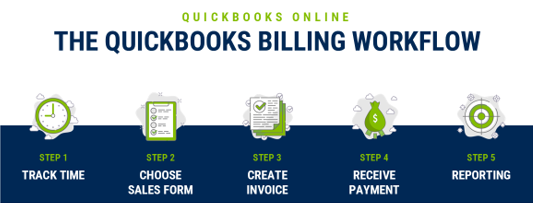
How does QuickBooks help track billable time?
If your business bills customers by the hour, consistent time tracking helps protect revenue. For businesses that provide consulting services, construction work, bookkeeping, or other project-based work, timely and reliable entries make it easier to invoice clients correctly.
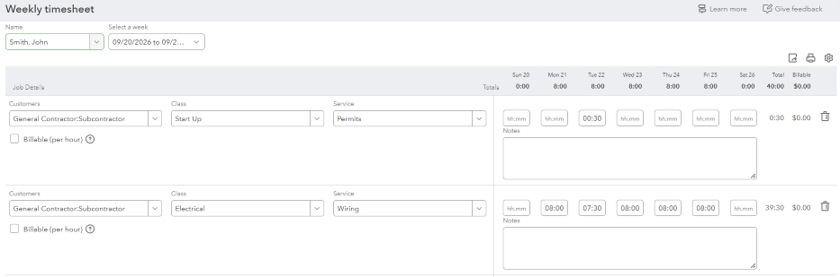
QuickBooks allows businesses to record time by employee, customer, project, or service. Hours can also be marked as billable, making them available later when it's time to invoice the customer. Rather than relying on manual timesheets or separate spreadsheets, businesses can maintain one centralized record that supports both customer billing and payroll.
Beyond improving accuracy, tracking time can also provide valuable insight into your operations by helping answer questions such as:
- How much time was spent on a project?
- Are projects being completed profitably?
- Have all billable hours been invoiced?
- Where are employees spending the majority of their time?
Even a small amount of missed time can add up. For example, a contractor who forgets to bill just two hours each week could lose meaningful revenue over a year, depending on their hourly rate.
Record Employee Time by Customer, Project, or Service
How does tracked time become an invoice?
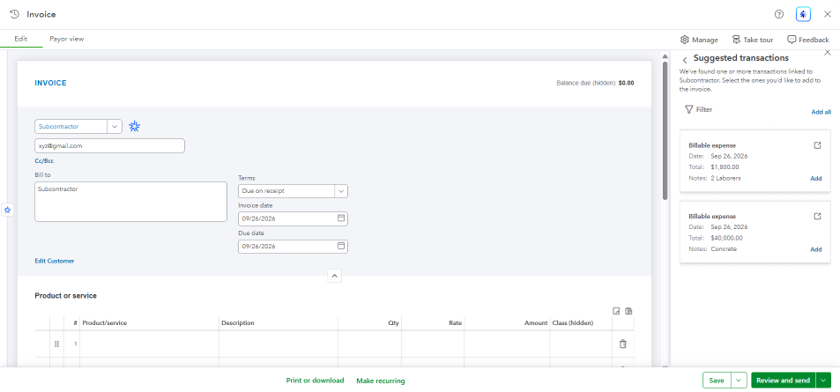
One of QuickBooks' biggest advantages is connecting time tracking directly to customer billing. When you record billable time and expenses in QuickBooks, you can pull them directly into customer invoices, reducing manual data entry and improving billing accuracy.
This streamlined workflow offers several benefits:
- Reduces duplicate data entry
- Minimizes billing errors
- Helps ensure all billable work is captured
- Speeds up the invoicing process
For businesses sending dozens of invoices each month, eliminating duplicate data entry can save hours of administrative work while helping invoices reach customers sooner.
Pull Billable Activity Directly Into an Invoice
Which QuickBooks sales form should I use?
QuickBooks includes several sales forms, each designed for a different stage of the customer relationship. Knowing when to use each one helps keep your accounting records accurate and create a smoother experience for your customers.
Estimates
An estimate provides a customer with an expected price before work begins. It helps establish expectations and, once approved, can often be converted into an invoice, eliminating the need to recreate the information later.
Invoices
Invoices are used when a customer pays after you provide goods or services. They track outstanding balances and allow businesses to monitor accounts receivable until payment is received.
Sales Receipts
A sales receipt records both the sale and payment at the same time. This form is typically used when customers pay immediately by cash, check, or credit card.
Statements
Statements summarize a customer's account activity over a specific period. They're commonly used as payment reminders or to help customers review multiple outstanding invoices.
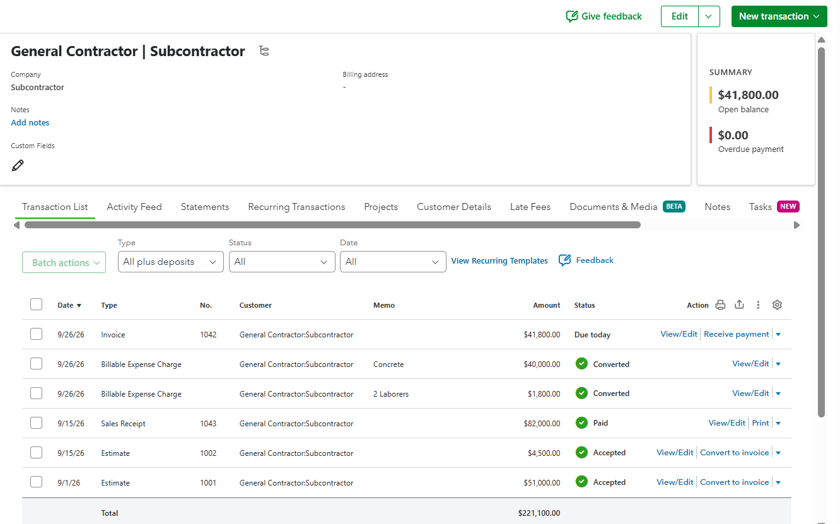
To illustrate, imagine a landscaping company installing a new patio. Before work begins, they send an estimate outlining the expected cost. Once the project is complete, that estimate becomes an invoice. If the customer pays immediately, a sales receipt records both the sale and payment. If payment is due later, the invoice remains open until it's paid, and a statement can summarize outstanding balances if a reminder is needed.
View Customer Transactions in One Place
Can QuickBooks automate your billing process?
One of the biggest advantages of modern accounting software isn't just creating invoices; it's reducing manual billing work. For example, businesses may be able to:
- Schedule recurring invoices for monthly services
- Create recurring sales receipts for customers on automatic payments
- Monitor outstanding invoices
- Send payment reminders
These tools can support more consistent billing and help improve cash flow, but they still require oversight. Businesses should regularly review invoices, verify pricing, and monitor accounts receivable to ensure automated workflows work as intended.
Automate Recurring Billing Activities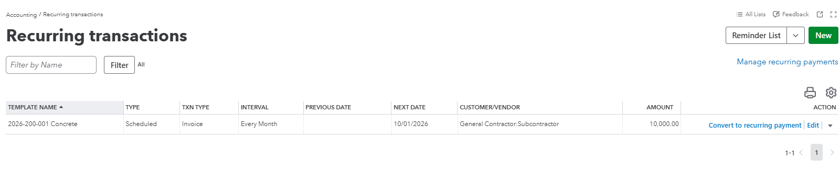
What are some common QuickBooks billing mistakes?
Even businesses that use QuickBooks regularly can miss opportunities to simplify their workflow. Some of the most common mistakes include:
- Tracking employee time but forgetting to mark billable hours
- Using the wrong sales form, which can make receivables harder to monitor
- Waiting too long to invoice after work is completed
- Letting customer balances go too long without review
- Using inconsistent service items or rates
- Keeping information in spreadsheets when it already belongs in QuickBooks
Many of these issues develop gradually. A billing process that worked with five customers may not work as well with one hundred. Periodically reviewing your workflow can uncover opportunities to save time, improve accuracy, and improve the customer experience.
Ready to get more out of QuickBooks with Lutz?
QuickBooks is a powerful tool, but its value goes far beyond recording transactions. When it's configured around your business and supported by the right processes, it can simplify time tracking, streamline billing, improve cash flow, and provide better visibility into your financial performance.
At Lutz, our Client Advisory Services (CAS) helps businesses optimize QuickBooks, improve accounting processes, integrate payroll and reporting workflows, and identify opportunities to work more efficiently. Rather than simply answering software questions, we help clients build systems that save time and improve accuracy. Contact us to start a conversation.

- Arranger, Analytical, Positivity, Responsibility, Woo
Tashina Cross
Tashina Cross, Client Advisory Services Manager, began her career in 2007. With an extensive background in client service, financial operations leadership, and internal accounting management, she has built a broad foundation in both public and industry environments.
Utilizing her expertise in outsourced accounting and operational restructuring, Tashina leads process improvement initiatives, outsourced controller services, and month‑end close functions. She partners with clients across a wide range of industries to strengthen financial reporting, internal controls, compliance processes, and system efficiencies. Tashina appreciates the challenge of uncovering the root of a system issue and crafting practical solutions that help clients operate more effectively.
Tashina lives in Omaha, NE, with her two dogs and her son. Outside of work, she can be found at sporting and family events, spending time at local parks and the zoo, or exploring new food spots.
Recent News & Insights

After the Midterms: What History Tells Investors
How does my business pick which AI tools to use?

Lutz Talent adds Jordan Berg as Construction Recruiter

Microsoft 365 Series: Get More Done with Microsoft Planner